If you're a Smash Melee bracket organizer hunting for a board that survives back-to-back venue weekends, the steelseries apex pro tkl wireless smash melee tournament setup is one of the strongest answers in 2026. The Apex Pro TKL Wireless gives you adjustable OmniPoint 2.0 magnetic switches, a tenkeyless footprint that fits in a stream backpack next to your CRTs and adapters, and tri-mode connectivity (2.4 GHz, Bluetooth, USB-C) so you can pivot between the TO laptop, the stream PC, and a backup machine without re-pairing. For TOs juggling Start.gg, OBS, and a Discord call while a pool is running late, that flexibility is the whole game.
Below we break down why this keyboard fits the bracket-runner workflow, which mice pair with it on a cramped TO table, and how to dial it in for a long Saturday of Melee.
Why the Apex Pro TKL Wireless Suits Melee TOs
Running a Melee bracket is not like running a Valorant LAN. You're not in a climate-controlled booth — you're at a folding table in a hotel ballroom, fighting CRT cable spaghetti, refereeing a ledgedash dispute, and trying to seed Loser's Round 4 before the venue kicks you out at midnight. Your keyboard has to be three things: portable, durable, and fast to type on. The Apex Pro TKL Wireless hits all three.



- Adjustable actuation (0.1–4.0 mm): Set a deep actuation when you're typing player tags into Start.gg so you don't fire double letters from a knuckle bump. Drop it to feather-light for OBS scene hotkeys.
- Tenkeyless layout: No numpad means more desk for your laptop, your phone running the venue Twitter account, and the inevitable energy drink.
- OLED smart display: Glanceable pool timer, current match ID, or the Discord notification count without alt-tabbing away from the bracket view.
- Battery life on 2.4 GHz: Comfortably clears a full regional weekend on a single charge, and USB-C top-ups while you're calling matches keep you alive.
- Aircraft-grade aluminum top plate: Survives being tossed into a milk crate with surge protectors and GameCube controllers.
- "Bracket" profile: Deep 2.5 mm actuation on alphanumeric keys (prevents accidental double-input when you're typing tags fast). Light 0.4 mm actuation on Ctrl, Tab, Enter for fast Start.gg form navigation.
- "Stream" profile: Bind F13–F19 via macro keys to OBS scene hotkeys. Use the OLED to display current scene.
- "Travel" profile: Disable RGB to maximize battery between venues.
For the steelseries apex pro tkl wireless smash melee tournament rig specifically, the wireless freedom matters more than you'd think. You'll constantly be turning the keyboard 90 degrees to let a player check their tag, sliding it to a competitor for a name correction, or handing it to a backup TO while you go fix a busted component cable. A wired board fights you on every one of those moves.
Bracket-Runner Peripheral Comparison
Most TOs already own a keyboard they like, but the mouse situation tends to be an afterthought — and a bad mouse on a TO laptop costs you minutes per round when you're click-dragging seeds. Here's how three popular wireless options stack up for the bracket-organizer workflow that lives next to the Apex Pro TKL Wireless.
| Mouse | Sensor / DPI | Weight | Battery | Best For TOs Who… |
|---|---|---|---|---|
| Logitech G PRO X2 SUPERSTRIKE | HERO 2 / 44K DPI | ~60 g | ~95 hrs | Stream the bracket and want zero latency on OBS scene switches |
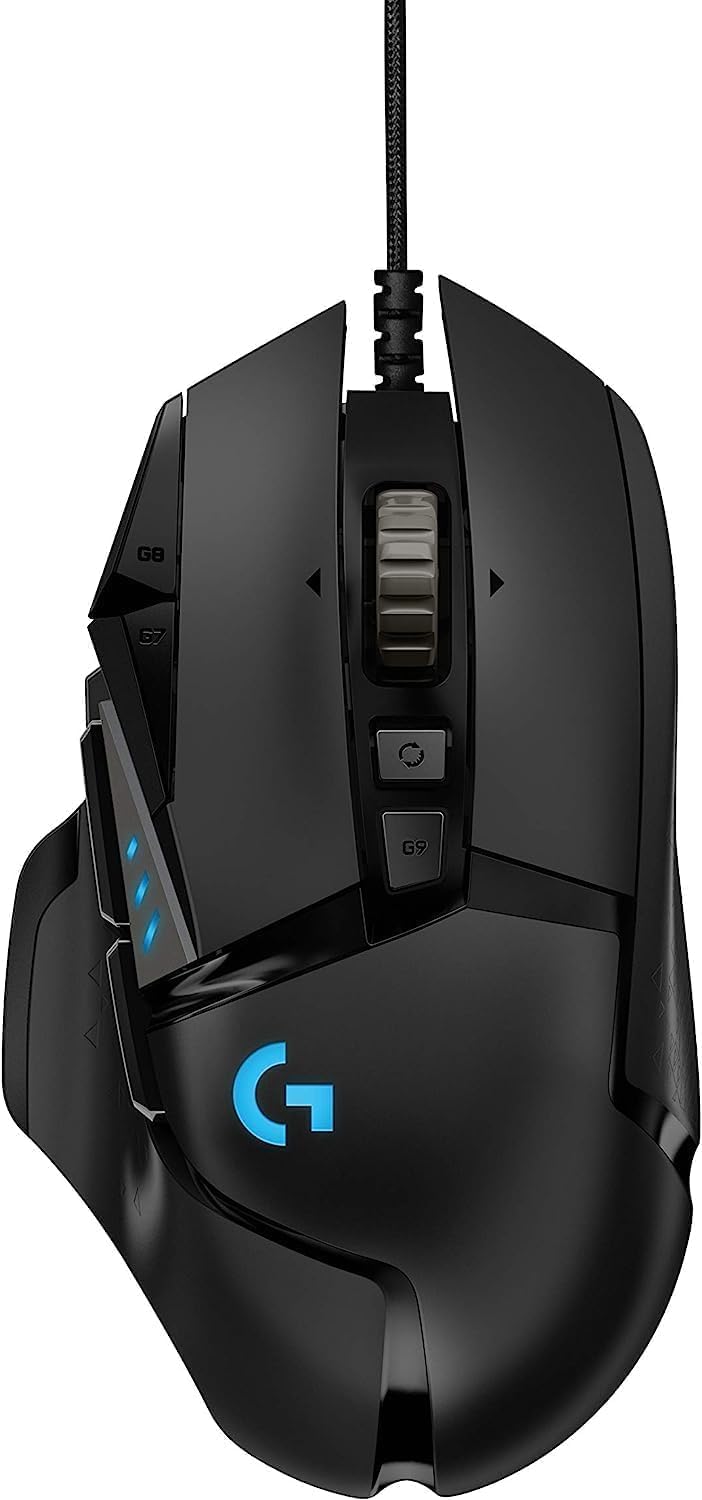
| Logitech G502 Lightspeed | HERO 25K | ~114 g | ~60 hrs | Live in Start.gg side panels and want extra macro buttons for seed/DQ |
| Logitech G305 Lightspeed | HERO / 12K DPI | ~99 g (with AA) | ~250 hrs | Forget to charge things and need an AA-powered failsafe at venue |
Top Mouse Picks to Pair With the Apex Pro TKL Wireless
1. Logitech G PRO X2 SUPERSTRIKE — The Stream-PC Companion
If you're the TO who also runs the stream, you're toggling OBS scenes, dragging player overlays, and pinging Discord all at once. The G PRO X2 SUPERSTRIKE's HERO 2 sensor and lightweight 60-gram shell make those tiny precision clicks effortless after eight hours behind the table. Pair it with the Apex Pro TKL Wireless over 2.4 GHz on two dongles and you have a latency profile that won't drop inputs even when the venue Wi-Fi is congested.
Check the Logitech G PRO X2 SUPERSTRIKE on Amazon
2. Logitech G502 Lightspeed — The Macro Workhorse
Bracket organizers who haunt Start.gg's admin panel love a mouse with extra side buttons. The G502 Lightspeed gives you 11 programmable buttons — bind one to "Report Score," one to "DQ Player," one to copy a match URL into Discord, and you'll claw back minutes per round. It's heavier than a pure FPS mouse, but you're not flicking AWP shots, you're navigating a web UI with hundreds of rows. The HERO 25K sensor tracks perfectly on a folding-table laminate or a quick travel mousepad.
Check the Logitech G502 Lightspeed on Amazon
3. Logitech G305 Lightspeed — The Backup You'll Be Glad You Packed
Every TO has been there: you arrive at the venue, unzip the gear bag, and realize the rechargeable mouse is dead and you forgot the cable. The G305 sidesteps the whole crisis by running on a single AA. A spare battery in the gear tote means you're never down a pointer, and at ~99 g it's light enough to use for an entire Sunday Top 8 without complaint. As a tertiary mouse for a side-bracket laptop or as a loaner for a guest commentator's setup, it's hard to beat.
Check the Logitech G305 Lightspeed on Amazon
4. Amazon Basics 2.4 GHz Wireless Mouse — The Loaner Pile
Big regionals run satellite stations: side-event laptops, signup kiosks, a merch tablet. You don't want to hand your $150 mouse to a volunteer running redemption brackets in the back room. A stash of cheap Amazon Basics wireless mice solves the problem — they're disposable, they work, and if one walks off with a player, you're not heartbroken.
Check the Amazon Basics Wireless Mouse on Amazon
Dialing In the Apex Pro TKL Wireless for Bracket Days
Once your steelseries apex pro tkl wireless smash melee tournament rig is built, spend ten minutes in SteelSeries GG configuring it for the actual job. A few profile suggestions:
Save these to onboard memory so the keyboard works the same way the moment you plug into a venue PC without installing software.
What About Wired? Why Wireless Wins at Venues
Some Melee purists default to wired everything because the scene grew up on it. But for the TO seat — not the player seat — wireless is the right call. Venue tables get bumped. Cable runs from the stream PC to the capture stack to the TO laptop already number in the double digits. Adding a permanent keyboard tether means every time someone walks around your table, your board scoots. The Apex Pro TKL Wireless on 2.4 GHz delivers the same effective latency as wired for typing and hotkey work, and the freedom to lift the board and rotate it to a player is worth the small premium.
For more on tournament-ready peripherals, see our guides on best TKL keyboards for FGC tournament organizers, wireless mice for Start.gg bracket runners, and Melee stream setup essentials for 2026.
Frequently Asked Questions
Is the SteelSeries Apex Pro TKL Wireless tournament legal at Smash Melee events?
The Apex Pro TKL Wireless is a peripheral for the TO and stream stations, not the player station. Melee is played on GameCube controllers via console or Slippi setups, so tournament legality concerns apply to controllers, not your bracket-running keyboard. You can use any keyboard you want at the TO table.
How long does the Apex Pro TKL Wireless battery last during a weekend regional?
SteelSeries rates the board around 40 hours on 2.4 GHz with RGB on, and noticeably more with RGB off or on Bluetooth. For most weekend regionals (Friday setup through Sunday Top 8), a single charge with moderate RGB will see you through, and you can top up via USB-C while still typing during pool sweeps.
Can I run the keyboard and a wireless mouse on the same USB dongle?
No — the Apex Pro TKL Wireless uses its own 2.4 GHz dongle, and Logitech Lightspeed mice use the Logi dongle. Both occupy separate USB ports. On a tight TO laptop with only two USB-A ports, run the keyboard on 2.4 GHz and put the mouse on Bluetooth, or use a powered USB hub that you've pre-tested.
What's the best wireless mouse for running brackets on Start.gg?
For pure efficiency in Start.gg's admin UI, the Logitech G502 Lightspeed wins because its extra side buttons let you bind common bracket actions to single clicks. If you also stream and need precision in OBS, the G PRO X2 SUPERSTRIKE is the better all-rounder. Pair either with the Apex Pro TKL Wireless on the same desk.
Will the Apex Pro TKL Wireless survive being transported in a gear tote with CRTs and adapters?
The aircraft-grade aluminum top plate is the main reason this board shows up on TO recommendations. It handles being packed alongside surge protectors, GCC adapters, and OEM cables better than plastic-frame boards. Throw it in a padded sleeve inside the tote and you'll get years out of it.
Do I need software installed on the TO laptop to use the keyboard?
No. SteelSeries GG only needs to run when you're changing profiles or updating firmware. Save your "Bracket" and "Stream" profiles to the keyboard's onboard memory and the board works identically when plugged into a venue computer, a borrowed laptop, or your backup machine.
Is the OLED display actually useful or is it a gimmick for the steelseries apex pro tkl wireless smash melee tournament workflow?
For TOs, it's surprisingly useful. Set it to show a running pool timer, the current match number, or even a Discord unread count. Glancing at the keyboard is faster than alt-tabbing away from the bracket page, and during a hectic Top 64 it shaves real time off every round.
Bottom Line for Bracket Organizers
The Apex Pro TKL Wireless is not the cheapest keyboard you can put on a TO table, but it is one of the few that's actually designed around how bracket organizers work: portable, wireless, durable, and configurable per task. Pair it with a workhorse wireless mouse like the G502 Lightspeed or G PRO X2 SUPERSTRIKE, keep a G305 in the bag as a backup, and stock a couple of Amazon Basics mice for satellite stations. That's the steelseries apex pro tkl wireless smash melee tournament kit that gets you through a 200-entrant regional without thinking about your peripherals once.
Key Takeaways
- Choosing the right steelseries apex pro tkl wireless smash melee tournament means matching capacity and output ports to your actual devices
- Always check actual watt-hours (Wh), not just watts — runtime depends on Wh, not peak output
- Also covers: apex pro tkl tournament organizer keyboard
- Also covers: smash melee bracket runner setup
- Also covers: portable wireless tkl tournament
- Compare price-per-Wh across models to find the best value for your budget