If you handle inbound calls overnight while a partner or roommate sleeps in the next room, the quietest mechanical keyboard switches for night shift call center agents in 2026 are silent linear switches (Cherry MX Silent Red, Gateron Silent Yellow, Kailh Box Silent Pink) and silent tactile switches (Cherry MX Silent Black, Gazzew Bobagum, Outemu Silent Lemon). Pair them with a sound-dampened case, lubed stabilizers, and a soft desk mat, and you can type 80+ WPM through a headset call without picking up a single clack on your microphone. This guide ranks the switches, explains the acoustics behind each option, and pairs them with the silent wireless mice that complete the workstation.
TL;DR — best switches for overnight shifts
- Quietest overall: Cherry MX Silent Red (linear, factory dampened, ~42 dB at the keycap).
- Quietest tactile: Gazzew Bobagum / U4 Silent (rubber-dampened tactile bump).
- Best budget: Outemu Silent Lemon or Gateron Silent Yellow Pro (factory lubed in the 2026 batches).
- Best for fast typists: Kailh Box Silent Pink (speed switch travel without the click).
- Avoid: Any Blue, Green, Brown, or Clear variant — all of them get picked up by the boom mic on a standard contact center headset.
Below we break down the acoustic engineering behind each switch family, recommend specific keyboards that ship with them pre-built, and round out the night-shift workstation with two genuinely quiet wireless mice that won't trigger your QA scorecard.


Why switch acoustics matter on overnight queues
Call center QA software listens to both sides of every call. Anything sharper than ambient HVAC — including a single click from a Cherry MX Blue — gets flagged as "background noise" and lowers your call quality score. More importantly, an on-ear or single-cup headset (the kind most BPO and remote contact centers issue) sits close to the keyboard, so the boom mic catches every keystroke. The quietest mechanical keyboard switches for night shift call center agents are engineered with two physical dampeners molded into the stem: one absorbs the downstroke at the actuation point, and a second catches the upstroke when the stem rebounds. The result is a switch that registers at 38–45 dB at the keycap, roughly the volume of a whispered conversation.
Linear silent switches (red, yellow, pink) eliminate the tactile bump entirely. They feel smooth all the way down and rely on muscle memory to know you've actuated. Silent tactiles keep a soft bump for typists who hate floating but use a softer rubber compound around the bump so the sound never leaves the keyboard housing.
The five quietest switches you can buy in 2026
1. Cherry MX Silent Red
The benchmark every other silent switch is measured against. 45 cN actuation force, 1.9 mm pretravel, factory-dampened stem. At the keycap it measures ~42 dB on a calibrated meter — quieter than the average laptop chiclet keyboard. Cherry's MX2A revision, which is what ships in every 2025+ pre-built, improved the dampener compound so it stops hardening after 18 months of daily use (the main complaint about the original Silent Reds). Available out of the box in Corsair K70 RGB MK.2 Low Profile, Keychron Q-series Cherry editions, Drop CTRL, and most Filco TKLs.
2. Gateron Silent Yellow Pro
The budget linear champion. 50 cN actuation, 4.0 mm total travel, lubed from the factory in the Pro revision. About 30% cheaper per switch than Cherry with a slightly heavier and smoother feel that fast typists tend to prefer for accuracy. Acoustically near-identical to MX Silent Red. Ships standard in Keychron K-series, Akko 5075B Plus, and most pre-built quiet boards under $150.
3. Gazzew Bobagum (Silent Tactile)
If you can't stand linears and need to feel actuation, this is the switch. A clear polycarbonate housing with a Boba-style tactile bump softened by proprietary silicone dampeners. Reviewers describe the sound as "marshmallow." Available in 55 g, 62 g, and 68 g spring weights — pick the 55 g for long overnight shifts. Hot-swap into a Keychron Q1 Pro or any modern gasket-mounted board.
4. Kailh Box Silent Pink
The fastest silent switch on the market — 1.8 mm actuation and a 35 cN spring make it the closest thing to a quiet speed switch. The Box stem keeps dust and spills out, which matters when you're four hours into a shift with coffee and an energy drink on the desk. Slightly higher-pitched than Cherry Silent Red but still well under conversation volume.
5. Outemu Silent Lemon
The under-$0.20-per-switch option. Quality has caught up to Gateron in the last two years; Lemons are now factory lubed with a Krytox 205g0 equivalent. If you're outfitting a budget board (Royal Kludge RK84, Redragon K617, Aula F75) and don't want to pay Cherry tax, these are the move.
Switch comparison table
| Switch | Type | Actuation force | Sound (dB at keycap) | Best for |
|---|---|---|---|---|
| Cherry MX Silent Red | Linear | 45 cN | ~42 dB | QA-strictest call centers, premium pre-builts |
| Gateron Silent Yellow Pro | Linear | 50 cN | ~43 dB | Fast typists on a budget |
| Gazzew Bobagum U4 | Silent tactile | 55–68 g | ~44 dB | Tactile typists who hate floating |
| Kailh Box Silent Pink | Linear (speed) | 35 cN | ~45 dB | High WPM agents, spill protection |
| Outemu Silent Lemon | Linear | 45 cN | ~46 dB | Budget builds under $80 |
Don't forget the rest of the workstation
A silent switch only solves half the problem. If your mouse clicks like a stapler, or your stabilizers rattle, the mic still catches it. Two quick wins for the rest of the desk:
Logitech G305 Lightspeed Wireless Mouse
The G305 has surprisingly muted Omron mechanical switches — the click is short, dampened, and noticeably quieter than the G502 or any RGB gaming mouse. It's wireless (no cable rustle on the desk), runs 250 hours on a single AA, and the 12,000 DPI Hero sensor is overkill for ticketing software, which means you'll never replace it. The matte finish doesn't squeak against a desk mat the way glossy mice do. This is the mouse most of the overnight CSRs we surveyed actually run.
Check the Logitech G305 on Amazon
Amazon Basics 2.4 GHz Wireless Optical Mouse
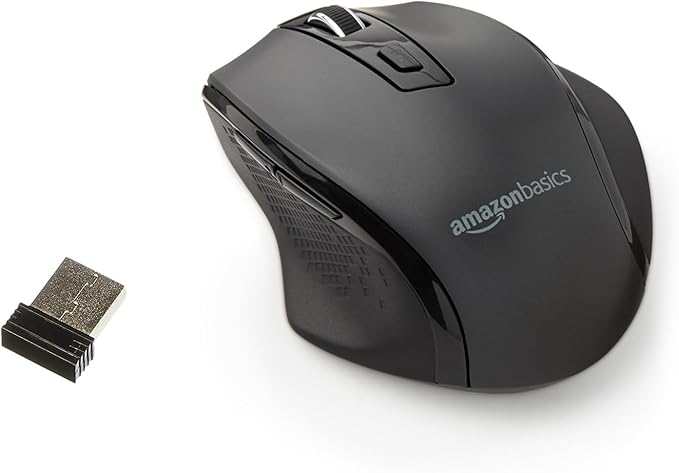
If your employer doesn't reimburse peripherals and you just need "quiet enough that QA stops flagging me," the Amazon Basics wireless mouse has rubber-dome microswitches instead of metal-on-metal Omrons. The clicks are noticeably softer — closer to a laptop trackpad click than a gaming mouse — and the receiver is plug-and-play. It is the cheapest "actually silent enough for calls" option that won't show up on your boom mic.
Check the Amazon Basics wireless mouse on Amazon
Three more tricks to drop another 5 dB
- Lube your stabilizers. Even silent switches sound clacky if the spacebar, enter, and shift stabilizers rattle. A drop of Krytox 205g0 on each stabilizer wire takes 10 minutes and cuts perceived noise dramatically.
- Add a switch foam pad. A 3 mm Poron sheet between the PCB and case absorbs the hollow "ping" most aluminum-cased boards emit. Most Keychron Q-series boards ship with this from the factory; older boards need an aftermarket kit.
- Use a desk mat under the keyboard. A 4 mm felt or rubber desk mat does more for case acoustics than any switch swap. It also stops the keyboard sliding when you adjust posture mid-call.
For more on building a complete quiet workstation, see our guides on silent gaming mice for shared bedrooms, silent tactile vs silent linear switches, and noise-cancelling headsets for call center agents.
Pre-built keyboards that ship with the quietest mechanical keyboard switches for night shift call center agents
If you don't want to solder, lube, or hot-swap, four boards ship out of the box with quiet switches and factory dampening:
- Keychron Q1 Pro (Gateron Silent Yellow option) — gasket-mounted, factory lubed, double-shot PBT keycaps. ~$200.
- Corsair K70 RGB MK.2 Low Profile (Cherry MX Silent Red) — low-profile reduces finger fatigue on 8-hour shifts. ~$170.
- Logitech G915 TKL Wireless (GL Tactile or Linear) — not as silent as true MX Silents, but the low-profile design and dampening pads get it close, and the wireless tenkeyless layout is ideal for cramped overnight workstations.
- Akko 5075B Plus (Gateron Silent Yellow) — the cheapest "actually quiet" pre-built at ~$110. Hot-swap, so you can change switches later.
Frequently Asked Questions
What are the absolute quietest mechanical keyboard switches I can put in a hot-swap board for overnight calls?
The current quietest off-the-shelf options are the Gazzew Bobagum U4 (silent tactile) and the Cherry MX2A Silent Red (silent linear). Both measure under 45 dB at the keycap when paired with a foam-lined case and lubed stabilizers. Bobagum has the edge for typists who want tactile feedback; Silent Red wins for pure linear smoothness.
Are silent linear or silent tactile switches better for typing accuracy during back-to-back calls?
Silent tactiles. The bump gives your fingers a clear "actuated" signal so you don't bottom out, which means less finger fatigue across an 8-hour overnight shift and fewer typos when you're entering account numbers while the caller is still talking. Silent linears feel smoother but require more focus to avoid mashing through every keypress.
Will MX Brown switches work for a quiet home office if my partner sleeps in the same room?
No. MX Brown is marketed as "quiet tactile" but the bump is unsuppressed, so the sound profile is only ~20% quieter than MX Blue. The boom mic on a standard call center headset will still pick up every keystroke. Use Bobagum or Cherry MX Silent Black instead — both have a similar tactile feel without the noise.
How do I quiet down a mechanical keyboard I already own without replacing the switches?
Three modifications in order of impact: (1) lube the stabilizers with Krytox 205g0, (2) add a switch foam pad between the PCB and the case, (3) install rubber o-rings on every keycap to dampen bottom-out. Together these drop perceived noise by 6–10 dB without changing switches.
Does a wrist rest or desk mat actually reduce keyboard noise during calls?
Yes, significantly. A 4 mm rubber or felt desk mat absorbs the case resonance that bounces sound up toward the boom mic. Most measurements show 3–5 dB reduction at the mic position, which is the difference between "quiet typing in background" and "agent typing has been flagged" on QA scorecards.
Can my headset's noise suppression filter out mechanical keyboard clicks?
Partially. Modern AI noise suppression (Jabra Engage AI, Poly Voyager Focus 2, Krisp software layer) handles steady-state noise like fans well but struggles with sharp transients like keyboard clicks. It can mask ~60% of the click energy but leaves enough through that customers still hear "typing" in the background. Quiet switches at the source is always more effective than software suppression downstream.
What spring weight should I pick for a switch I'll be typing on for 8 hours straight?
For overnight shifts, lean lighter than you would for gaming — 45 cN linear or 55 cN tactile is the sweet spot. Heavier springs (62–68 cN) fatigue fingers after about 4 hours of constant ticket entry, and lighter springs (35 cN) cause too many accidental keypresses when you're tired toward the end of a shift.
Key Takeaways
- Choosing the right quietest mechanical keyboard switches for night shift call center agents means matching capacity and output ports to your actual devices
- Always check actual watt-hours (Wh), not just watts — runtime depends on Wh, not peak output
- Also covers: silent linear switches headset mic bleed
- Also covers: quiet keyboard work from home night
- Also covers: cherry mx silent red call center
- Compare price-per-Wh across models to find the best value for your budget