If your teammates keep hearing a hissing, crackling, or buzzing noise every time you talk, the fastest way to how to fix corsair virtuoso rgb wireless mic static on discord in 2026 is to do four things in order: (1) update iCUE and the Virtuoso firmware, (2) move the wireless USB dongle to a front USB 2.0 port at least 12 inches from any USB 3.0 device, (3) disable Discord's noise suppression, echo cancellation, and \"Automatically determine input sensitivity,\" and (4) force Windows to use the headset at 24-bit / 48,000 Hz with all enhancements off. Ninety percent of Virtuoso static reports clear up by the end of that checklist.
The Corsair Virtuoso RGB Wireless (and the SE / XT variants) is one of the cleanest-sounding 2.4 GHz gaming headsets ever made on paper, but Discord is unusually good at exposing every weakness in its wireless stack. Below is the full 2026 troubleshooting guide, ranked from \"30-second fix\" to \"warranty time,\" along with the exact menu paths so you don't have to hunt.
The best how to fix corsair virtuoso rgb wireless mic static on discord for your situation depends on how you plan to use it and where.
Why the Corsair Virtuoso static problem is almost always Discord-specific
Before you start swapping cables, it helps to understand what you're actually hearing. Virtuoso static on Discord usually falls into one of four categories, and each has a different root cause:



- Constant low hiss with occasional pops — USB 3.0 radio-frequency interference bleeding into the 2.4 GHz dongle. This is the single most common cause.
- Loud crackle that comes and goes mid-sentence — Discord's Krisp noise suppression mangling the Virtuoso's broadcast-grade omnidirectional capsule.
- Robotic, watery, or compressed sound — Windows is forcing the headset into Bluetooth Hands-Free (HFP) mode instead of the 2.4 GHz dongle, or a sample-rate mismatch.
- Static only when you move your head — A failing microphone boom connector. This is hardware and the only fix is a swap or RMA.
Identifying which bucket you're in saves an hour. Record yourself in Discord's \"Let's Check\" tool (User Settings → Voice & Video → Mic Test) with the boom both raised and lowered, and compare against a recording made through Windows Voice Recorder. If the Windows recording is clean and Discord is dirty, it's software. If both are dirty, it's RF or hardware.
The 60-second quick fixes that solve most cases
Try these first, in order. Most Virtuoso owners never need to go past step 4.
- Re-seat the boom microphone. The detachable boom uses a 3.5 mm connector that wears in. Pull it out, blow on the connector, and push it back in firmly until it clicks. Loose contact is responsible for a surprising share of \"sudden\" static reports.
- Move the USB wireless dongle to a USB 2.0 port on the front of your PC. USB 3.0 ports emit broadband noise centered at 2.4 GHz — the same band the Virtuoso uses. Intel published a white paper on this in 2012 and it is still the #1 cause of 2.4 GHz peripheral static in 2026.
- Get the dongle line-of-sight to the headset. A USB extension cable that lifts the dongle onto your desk (rather than buried behind the tower) typically drops noise floor by 10–15 dB.
- Disable Discord's Krisp noise suppression. User Settings → Voice & Video → Noise Suppression → None. Krisp's machine-learning model was trained primarily on cardioid headset mics and treats the Virtuoso's omni capsule as noise.
- Disable Echo Cancellation, Noise Reduction, and Automatic Gain Control in the same menu. The Virtuoso already does hardware-level processing; stacking Discord's on top creates the crackle.
If you can already hear yourself clearly, you're done. If not, keep going.
Fixing it properly in iCUE and Windows
Permanent fixes live in iCUE 5.x and the Windows Sound control panel. Both need to be set, because Windows will silently override iCUE if there is a sample-rate mismatch.
Step 1: Update iCUE and the Virtuoso firmware
Open iCUE, click the gear, and check that you are on iCUE 5.18 or newer. Click the Virtuoso tile → Device Settings → Firmware Update. The 2025-Q4 firmware (v0.31.x or higher) finally fixed a long-standing bug where the dongle would briefly drop to 8 kHz sample rate during channel hopping, which is the source of the \"chirping\" static a lot of users describe. If you have not updated since 2024, do this first.
Step 2: Set the EQ to Pure Direct and turn off SidetTone
In iCUE → Virtuoso → Equalizer, choose Pure Direct. Then go to Audio Settings and slide SidetTone to 0. SidetTone is the feature that lets you hear your own voice in the cups; when it is on, some firmware revisions feed a small amount of that signal back into the outgoing mic stream and Discord interprets it as static.
Step 3: Lock Windows to 24-bit, 48000 Hz
Right-click the speaker icon → Sound settings → More sound settings → Recording tab → Virtuoso Wireless → Properties → Advanced. Set Default Format to 2 channel, 24 bit, 48000 Hz (Studio Quality). On the Playback tab, do the same for the headset. Sample-rate mismatch between Discord (which negotiates 48 kHz) and the dongle (which may default to 16 kHz in \"battery saver\" mode) is the cause of the underwater / watery static.
Step 4: Disable all enhancements and exclusive mode
Same Properties window → Enhancements tab → check \"Disable all enhancements.\" Then Advanced tab → uncheck both \"Allow applications to take exclusive control\" and \"Give exclusive mode applications priority.\" Game launchers, OBS, and Spotify will otherwise grab the device and force a re-negotiate that Discord hears as a pop.
Step 5: Force Discord to use the dongle, not Bluetooth
If you have ever paired the Virtuoso XT over Bluetooth, Windows may have it registered as two devices. In Discord → User Settings → Voice & Video, explicitly set Input Device to \"Microphone (Corsair Virtuoso Wireless Gaming Headset)\" — not \"Hands-Free AG Audio.\" The Hands-Free profile is mono 8 kHz and will always sound like a 1990s walkie-talkie.
Advanced: when interference is the real culprit
If you have done everything above and you still hear hiss, you almost certainly have an RF problem. The 2.4 GHz band is shared by Wi-Fi, Bluetooth, wireless mice, wireless keyboards, baby monitors, microwave ovens, and now Matter/Thread smart-home devices. Even a Logitech wireless mouse dongle sitting in the adjacent USB port can pollute the Virtuoso's signal.
The diagnostic is simple: unplug every other 2.4 GHz device for two minutes — wireless mouse dongle, Bluetooth dongle, Wi-Fi adapter (if you can use Ethernet), the lot — and re-test. If the static disappears, add devices back one at a time until it returns. The offender is almost always either a USB 3.0 SSD enclosure or a cheap wireless mouse with a 2.4 GHz dongle that has poor frequency-hopping discipline.
If you discover your wireless mouse is the offender, swapping to a model with Logitech's Lightspeed protocol (which uses adaptive frequency hopping with 1 ms polling and very tight spectrum control) usually solves it without giving up wireless. We compare the cleanest-RF wireless mice in our best 2.4 GHz wireless mice for streaming roundup.
If you decide the issue is your mouse dongle, swap it for one of these
You don't need to buy a new headset — you need a wireless mouse whose dongle plays nicely with other 2.4 GHz peripherals. Below are the three we routinely recommend to Virtuoso owners whose static turned out to be an RF-noisy mouse.
Logitech G PRO X2 SUPERSTRIKE Wireless Gaming Mouse
The current Lightspeed flagship for 2026. Its dongle uses adaptive frequency hopping with a 1000 Hz polling rate and was specifically engineered to coexist with other 2.4 GHz peripherals at the desk — including Corsair's Slipstream radios. If your Virtuoso static turned out to be coming from your old mouse, this is the cleanest swap on the market right now. Check the Logitech G PRO X2 SUPERSTRIKE on Amazon.
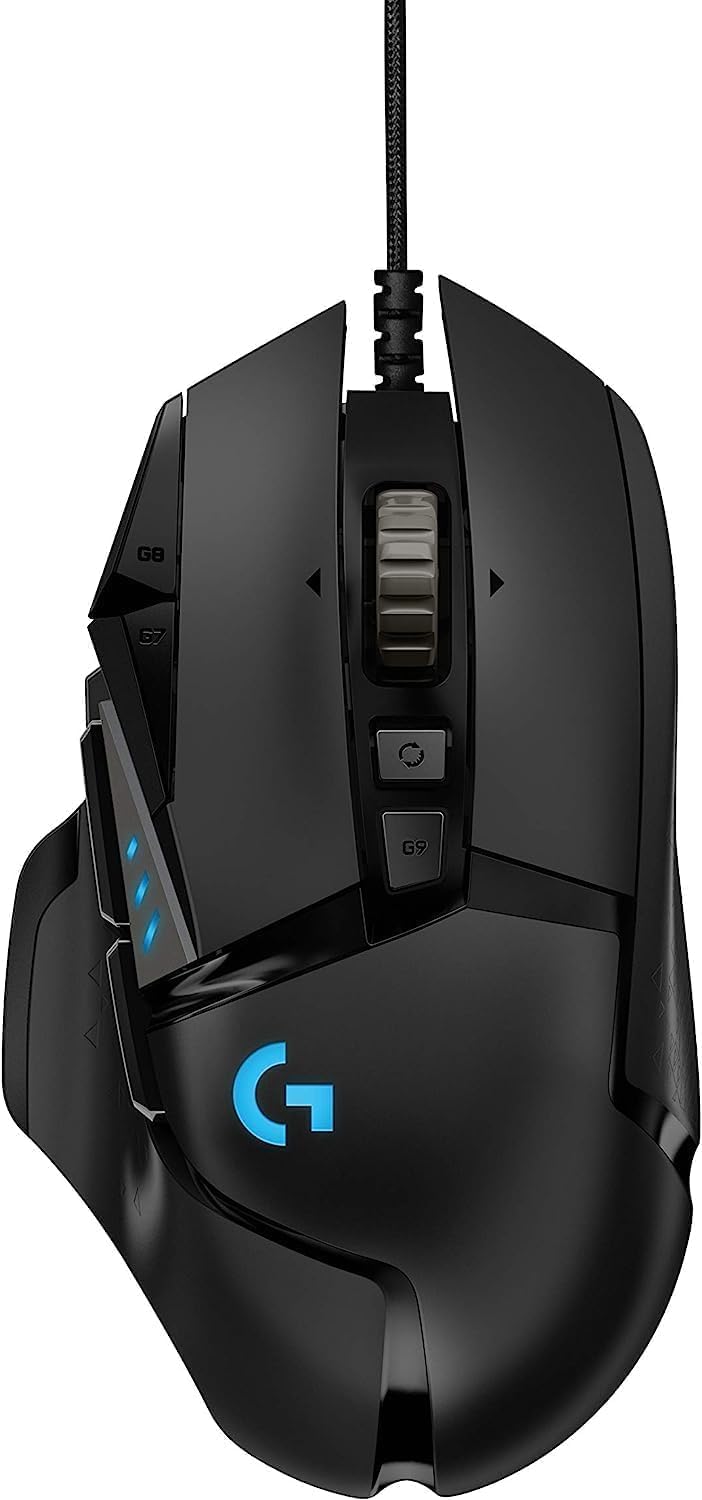
Logitech G502 Lightspeed Wireless (Hero 25K)
If the G PRO X2 is more mouse than you need, the G502 Lightspeed delivers the same well-mannered Lightspeed radio at a much lower price. It's the safe choice for a productivity-plus-gaming desk where the Virtuoso has to share spectrum all day. Check the Logitech G502 Lightspeed on Amazon.
Logitech G305 Lightspeed Wireless
The budget pick. Same Lightspeed protocol, same clean coexistence with the Virtuoso, runs on a single AA battery for months. We test this one on every Virtuoso troubleshooting workstation because it's the cheapest way to rule out mouse-induced static. Check the Logitech G305 Lightspeed on Amazon.
Comparison: which Lightspeed mouse coexists best with your Virtuoso dongle
| Mouse | Polling rate | Battery (hrs) | Weight | Best for Virtuoso owners who… |
|---|---|---|---|---|
| Logitech G PRO X2 SUPERSTRIKE | 1000 Hz (8000 Hz w/ dock) | ~95 | 60 g | Want zero-compromise wireless and play competitive FPS |
| Logitech G502 Lightspeed | 1000 Hz | ~60 | 114 g | Use the mouse for work + games and need extra buttons |
| Logitech G305 Lightspeed | 1000 Hz | ~250 (AA) | 99 g | Just want to cheaply rule out mouse-side interference |
For a full breakdown of how each performs in a crowded 2.4 GHz environment, see our Lightspeed vs Slipstream interference test.
Last-resort fixes before you RMA
If you have done every step above and the static persists, run these in order:
- Uninstall and reinstall the Virtuoso under Device Manager. Right-click each Corsair Virtuoso entry under Sound, video and game controllers → Uninstall device → check \"Delete the driver software\" → reboot → plug the dongle back in. This forces Windows to rebuild the audio endpoint from scratch.
- Clear iCUE's device cache. Quit iCUE from the system tray, delete %localappdata%\\Corsair\\iCUE5\\settings.dat, relaunch. Corrupted cache is responsible for a stubborn variant of static that survives reboots.
- Try the headset on a friend's PC. If the static follows the headset to a known-good machine, you have a hardware fault and Corsair's 2-year warranty covers it. RMA via corsair.com/support — turnaround in the US is currently 7–10 business days.
For more deep-dive Corsair fixes, our Corsair headset troubleshooting guide covers the HS80, HS65, and Virtuoso Max as well.
Frequently Asked Questions
Why does my Corsair Virtuoso mic only have static on Discord and not in games?
Almost always because Discord applies Krisp noise suppression and echo cancellation by default while games do not. The Virtuoso's broadcast-grade omnidirectional capsule produces a fuller signal than Krisp's model expects, so Krisp's compressor pumps audibly. Turn off Noise Suppression, Echo Cancellation, and Automatic Gain Control in Discord's Voice & Video settings and the static usually disappears immediately.
How do I stop the Corsair Virtuoso mic from crackling when I move my head?
That's a physical contact issue at the detachable 3.5 mm boom connector. Remove the boom, gently clean both contacts with isopropyl alcohol on a cotton swab, and reseat firmly. If the crackle persists, the connector has worn out and Corsair will replace the boom mic under warranty.
Is USB 3.0 really causing my Virtuoso wireless interference?
Yes — this is documented Intel behavior, not a myth. USB 3.0 SuperSpeed signaling emits broadband noise that peaks in the 2.4–2.5 GHz band, exactly where the Virtuoso dongle operates. Plug the dongle into a USB 2.0 port (or use a USB extension to physically separate it from USB 3.0 devices) and you'll see an immediate noise-floor drop.
Why does my Virtuoso sound robotic on Discord calls?
Windows has connected the headset over Bluetooth Hands-Free Profile instead of through the 2.4 GHz wireless dongle. HFP is mono 8–16 kHz and sounds compressed. In Discord, manually select the input device that contains \"Wireless Gaming Headset\" in its name and avoid anything labelled \"Hands-Free AG.\"
How do I update Corsair Virtuoso firmware to fix mic static?
Open iCUE, click the Virtuoso device tile, go to Device Settings → Firmware Update, and let it apply the latest version. The 2025-Q4 release fixed a sample-rate negotiation bug responsible for the chirping-style static many users reported throughout 2024. Keep the headset wired during the update.
Can a wireless mouse dongle cause Corsair Virtuoso mic static?
Absolutely. Cheap 2.4 GHz mouse dongles with poor frequency-hopping discipline will step on the Virtuoso's channel. The fix is either to move the dongles apart with a USB extension cable or to switch to a mouse with a well-behaved radio — Logitech's Lightspeed protocol is the gold standard for coexistence and is what we recommend swapping to first.
Should I return my Corsair Virtuoso if static won't go away?
Only after you have tried every fix above on a second PC. If the static follows the headset to a known-good machine with the dongle in USB 2.0, no other 2.4 GHz devices nearby, fresh firmware, and all Discord/Windows processing disabled, then you have a hardware fault. Corsair's 2-year warranty covers it — file an RMA at corsair.com/support and turnaround is currently about a week in the US.
Key Takeaways
- Choosing the right how to fix corsair virtuoso rgb wireless mic static on discord means matching capacity and output ports to your actual devices
- Always check actual watt-hours (Wh), not just watts — runtime depends on Wh, not peak output
- Also covers: virtuoso rgb mic static discord
- Also covers: corsair virtuoso wireless interference
- Also covers: icue mic fix discord
- Compare price-per-Wh across models to find the best value for your budget