Quick Comparison Table
| Keyboard | Best For | Price | Rating |
|---|---|---|---|
| Redragon K556 (Hot-Swap Brown) | Hot-swap tinkerers on a budget | 4.6/5 | |
| Corsair K100 RGB | No-compromise flagship | 4.4/5 | |
| SteelSeries Apex 3 | Quiet membrane + spill resistance | 4.6/5 | |
| Redragon K580 VATA | Clicky blue switches + macros | 4.6/5 | |
| Redragon K668 | Extra hotkeys + swappable keycaps | 4.5/5 |
Reviewed by the Gaming Peripheral Reviews Editorial Team
As an Amazon Associate, we earn from qualifying purchases.
Last Updated: July 2026 | Written by the Gaming Peripheral Reviews Editorial Team
If you are shopping for the best RGB gaming keyboards 2026 has on the shelves, you have probably noticed the category is a mess of near-identical marketing copy. Every board is "pro-grade," every switch is "lightning-fast," and every lighting system has 16.8 million colors. That last claim is technically true of almost all of them, which is exactly why it tells you nothing.
So we did this the boring, useful way. We pulled the manufacturer specifications and the live Amazon product data — titles, feature bullets, switch types — for ten keyboards and ranked them on what actually separates one from another: switch behavior, whether the board is hot-swappable, keycap material, software depth, and build. This site does not physically test, own, or use these keyboards; the recommendations come from the manufacturer's published specifications and Amazon's official product data. What follows is a specifications-driven read, and where a spec implies a trade-off, we say so plainly.
Here is the short version: hot-swap sockets and PBT keycaps are the two features that most reliably predict a board you will still like in two years, and both show up at surprisingly low price points now. Let's get into it.

- Aluminum Build That Won't Wobble - A tank-solid brushed aluminum board keeps every keystroke steady during intense sessions, unlike the flex you get from plastic-frame keyboards
- Swap Switches Without Soldering, Comfortable Out of the Box - The upgraded socket accepts almost any 3-pin or 5-pin switch, and the stock Brown switches give a soft tactile bump

- Ip32 water resistant – Prevents accidental damage from liquid spills
- 10-zone RGB illumination – Gorgeous color schemes and reactive effects

- Record Combos On the Fly, No Software Required - 5 dedicated macro keys (G1-G5) let you save complex combos or shortcuts directly on the keyboard, plus dedicated media controls
- Swap Switches Without Soldering, Hype Clicky Feedback - The upgraded socket accepts almost any switch, and stock Blue switches deliver a distinct tactile bump and audible click on

- Smooth, Effortless Keystrokes for Work and Play - Linear red switches need less force and give a straight, responsive press with no tactile bump, so long sessions feel light on
- Every Combo Registers, Wide Compatibility - 100% anti-ghosting with N-key rollover plus a gold-plated USB connector that works reliably across Windows and Mac

- 4 Extra Hotkeys, Full-Size 108-Key Anti-Ghosting - Dedicated shortcut keys default to mute, calculator, screen lock and desktop, while 104 keys register accurately even during
- Swap Switches Without Soldering, Smooth and Quiet - The upgraded socket accepts almost any 3-pin or 5-pin switch, and stock Red linear switches keep clicks discreet for shared
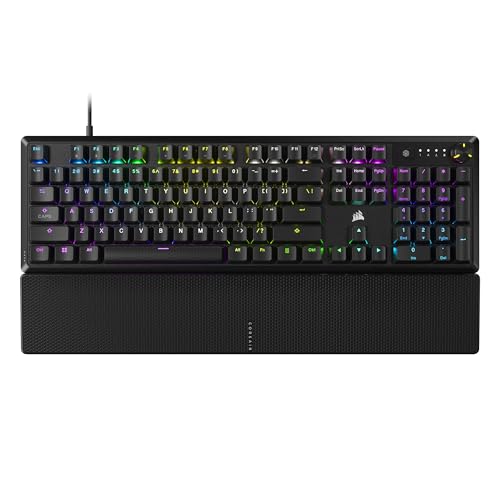
- Magnificent Mechanical Keyboard Experience: Pre-lubricated CORSAIR Red linear mechanical switches deliver smooth, responsive keystrokes, enhanced by two layers of sound dampening
- Masterful Media Control: Control volume and more with a multi-function rotary dial and programmable media button, customizable with iCUE

- The minimalist gaming Keyboard that maximizes results - in a world of gaming accessories that try too hard, welcome simplicity back on your desk with the Lenovo Legion K500 gaming
- Minimalistic premium design - declutter with a keyboard that gets the essentials right: compact and sturdy, featuring 7 media keys and a dedicated game mode key. Make it yours

- 【Mechanical Keyboard: Responsive BLue Switches】RisoPhy PC keyboard features clicky keys which offer you higher accuracy and quicker response with an enjoyable click sound when
- 【Rainbow Backlit Keyboard: illuminate Your Desktop】With 9 different backlights,5 levels of light speed and brightness,this computer keyboard enriches your gaming experience and
How We Research
Our method is documentary, not physical. For each keyboard we read the manufacturer's published specifications and the full Amazon listing — the product title, the feature bullets, the stated switch type and keycap material, the connectivity, and the aggregate star rating and review count as displayed at the time of writing (checked July 2026). We then translate each spec into a consequence a buyer actually feels: what a linear red switch means for rapid tapping, what a membrane dome means for feel and price, what PBT versus ABS means for keycap shine over time.
We do not open boxes, take measurements, or log hours. Every claim below is traceable to a spec sheet or a listing bullet, and we flag anything the data cannot confirm. Star ratings quoted here reflect Amazon's aggregate score at the time we checked; those numbers move, so treat them as a snapshot.
The Best RGB Gaming Keyboards for 2026
Redragon K556 RGB LED Backlit Wired Mechanical Gaming Keyboard — Best for hot-swap tinkerers on a budget
The headline spec on the Redragon K556 RGB LED Backlit Wired Mechanical Gaming Keyboard is the hot-swappable socket. That single feature changes the math on a budget board: if a switch dies or you decide you hate the feel, you pull it and drop in a new one with no soldering. Most keyboards in this price tier lock you into whatever switch shipped in the box, so this is a genuine differentiator, not a bullet-point flourish.
Redragon lists an aluminum base plus noise-absorbing foams, and those two together tell a consistent story: the board is aiming for a firmer typing surface and a less hollow, less pingy sound than a bare plastic tray. The default switch is a soft tactile brown, which gives you a bump you can feel without the loud click of a blue — a sensible middle ground for someone who games and types in the same room as other people. It is a full 104-key layout, so your numpad and function row are intact.
At a 4.6/5 aggregate rating, it sits at the top of this group on score, though note the listing showed no written review count when we checked, so weigh that rating accordingly.
Pros:
- Hot-swappable sockets let you change switches with no soldering
- Aluminum base and noise-absorbing foams target a firmer feel and quieter sound
- Full 104-key layout with numpad
- Tactile brown switch suits mixed gaming and typing
- Wired-only, and the listing does not indicate Prime shipping
- No written-review volume displayed to corroborate the 4.6 score
- Brand support and software depth are thinner than the Corsair/SteelSeries tier
Verdict: Buy this if you want to learn what switches you actually like without committing, and you would rather spend on the board than on brand.
Corsair K100 RGB Mechanical Gaming Keyboard — Best for the no-compromise flagship buyer
The Corsair K100 RGB Mechanical Gaming Keyboard is the spec-sheet maximalist of this list. It ships with Cherry MX Speed RGB Silver switches, which are linear with a short actuation — Cherry rates the Speed Silver at a 1.2mm actuation point, meaning the key registers earlier in the travel than a standard red. For twitchy, tap-heavy games that early trigger is the entire pitch; for typing, it means you will bottom out on keys you only meant to graze until your fingers adjust.
Two more specs matter here. First, PBT double-shot keycaps: PBT resists the greasy shine that ABS develops over time, and double-shot legends will not wear off. Second, deep iCUE software with Elgato Stream Deck integration, which turns the board into a control surface for macros, lighting, and stream actions rather than just a keyboard. This is the most capable software ecosystem in the roundup.
The trade-off is bluntly the price and the complexity — check the current price on Amazon, because this sits well above the Redragon tier. Its 4.4/5 aggregate rating is strong but not the highest here, and iCUE is famously a lot of software for people who just want to type.
Pros:
- Cherry MX Speed Silver switches with an early 1.2mm actuation for fast games
- PBT double-shot keycaps resist shine and legend wear
- Deepest software stack here via iCUE plus Elgato Stream Deck integration
- Established brand with mature firmware and RGB control
- Priciest board on this list by a wide margin
- The early-actuation Speed switch causes typos until you adapt
- iCUE is heavyweight software for users who want plug-and-play
Verdict: For the player who wants the flagship feature set and will actually use the software, this is the one to beat.
SteelSeries Apex 3 RGB Gaming Keyboard — Best for quiet play and spill resistance
The SteelSeries Apex 3 RGB Gaming Keyboard is the odd one out here, and deliberately so: it uses whisper-quiet gaming switches rather than mechanical ones. That means a soft, muted keypress instead of a defined tactile bump or click. If you share a space, game late at night, or use an open mic, that quiet is a real feature and not a compromise.
The spec that earns its spot is the IP32 water resistance rating. IP32 protects against dripping water and small solid objects — it is not dishwasher-proof, but it means a knocked-over drink is an inconvenience rather than a funeral for your keyboard. SteelSeries also lists 10-zone RGB illumination and a premium magnetic wrist rest in the box, which is a nicer inclusion than the glued-on plastic rests some rivals ship.
Understand what 10-zone lighting is, though: the board lights in ten independently colored blocks, not per-key. If you want a rainbow that flows key-by-key across the deck, this is not that. At 4.6/5 it ties for the top aggregate score in this group.
Pros:
- Whisper-quiet switches ideal for shared spaces and open mics
- IP32 rating adds real spill and dust resistance
- Premium magnetic wrist rest included
- Ties for the highest aggregate rating here at 4.6/5
- 10-zone lighting is not per-key RGB
- Membrane-style switches lack the crisp feel mechanical fans want
- No hot-swap; the feel you buy is the feel you keep
Verdict: The pick for quiet, spill-prone desks where a muted press beats a clacky one.
Redragon K580 VATA RGB LED Backlit Mechanical Gaming Keyboard — Best for clicky blue switches and onboard macros
The Redragon K580 VATA RGB LED Backlit Mechanical Gaming Keyboard with leans into the opposite philosophy of the Apex 3: it ships with blue switches, which are clicky and loud by design. You get a sharp audible click and a firm tactile bump on every keystroke. Some people find that immensely satisfying; anyone on a voice call will find it immediately audible. Know which camp you are in before you buy.
What makes it more than a generic clicky board is the feature bundle: dedicated macro keys, dedicated media controls, onboard macro recording, and a hot-swappable socket. Onboard macro recording is the underrated one — it means you can program a macro into the board's own memory rather than depending on software running on the host, which matters if you move the keyboard between machines. The hot-swap socket, as with the K556, lets you change switch feel later without soldering.
It carries a 4.6/5 aggregate rating, tying for the top of this list. Redragon is the listed brand here, which is worth noting given several entries in this category ship with unclear brand fields.
Pros:
- Clicky blue switches deliver strong tactile and audible feedback
- Onboard macro recording stores macros on the board itself
- Dedicated macro keys and media controls
- Hot-swappable socket for later switch changes
- Blue switches are loud — a poor fit for open mics or shared rooms
- No Prime shipping indicated on the listing
- Software ecosystem is lighter than Corsair or SteelSeries
Verdict: Get this if you want the loud, clicky, tactile experience with real macro flexibility built in.
Redragon K582 RGB Mechanical Gaming Keyboard — Best for durable keycaps at a low price
The Redragon K582 RGB Mechanical Gaming Keyboard makes its case on two specs: double-shot ABS keycaps and linear red switches. Double-shot construction molds the legend as a separate piece of plastic rather than printing it on top, so the characters will not rub off with use — a durability win even though the plastic itself is ABS rather than the shine-resistant PBT you get on the pricier Corsair K100.
The linear red switch is the smooth, bump-free option: no tactile step, no click, just a straight press down. That is the switch most competitive players gravitate to for fast repeated taps, and it is meaningfully quieter than the blue on the K580 VATA. Redragon also lists support for its Redefine software for lighting and remapping, and full dynamic 16.8M RGB backlighting across a standard 104-key layout.
At 4.5/5 it rates a touch below the top of the group. The main thing the spec sheet gives up versus the K556 is the hot-swap socket — the K582 listing does not indicate hot-swappability, so plan to keep the reds you buy.
Pros:
- Double-shot keycaps mean legends will not wear off
- Linear red switches are smooth and quieter than blues
- Redefine software support for lighting and remapping
- Full 104-key standard layout
- ABS keycaps can develop shine over time versus PBT
- No hot-swap socket indicated — switches are fixed
- No Prime shipping shown on the listing
Verdict: A strong pick for someone who wants smooth reds and long-lasting legends without paying flagship money.
Redragon K668 RGB Gaming Keyboard — Best for extra hotkeys and swappable keycaps
The Redragon K668 RGB Gaming Keyboard is the most-keys board here: 108 keys, which is the standard 104 plus four extra dedicated hotkeys. Those extra keys are the pitch — quick physical access to whatever you bind them to, without a function-layer chord. It ships on red switches, so the feel is smooth and linear like the K582.
The genuinely fun spec is that it comes with two sets of mixed-color keycaps in the box. That means you can restyle the deck without buying an aftermarket set — a real cost saving for anyone who cares how the board looks. It also lists an upgraded hot-swappable socket and sound-absorbing foams, putting it in the same tinker-friendly, quieter-sound bracket as the K556.
It rates 4.5/5. The caveat is the same one that runs through the Redragon lineup: brand field is unclear on the listing and no Prime shipping is shown, so factor delivery time into your decision.
Pros:
- 108 keys including four extra dedicated hotkeys
- Two sets of keycaps included for restyling
- Hot-swappable socket plus sound-absorbing foams
- Smooth linear red switches
- No Prime shipping indicated on the listing
- Red switches lack tactile feedback if you prefer a bump
- Extra hotkeys add width to an already full-size board
Verdict: Choose this if you want extra dedicated keys and the freedom to reskin the board out of the box.
CORSAIR K70 CORE RGB Mechanical Wired Gaming Keyboard — Best for pre-lubed switches and SOCD
The CORSAIR K70 CORE RGB Mechanical Wired Gaming Keyboard with Palmrest brings a couple of specs the budget boards do not. It ships with pre-lubed MLX Red linear switches — factory lubrication is meant to smooth the keystroke and cut scratchiness, something enthusiasts otherwise do by hand. It also lists SOCD, sound dampening, ABS double-shot keycaps, and a media control dial.
SOCD (Simultaneous Opposing Cardinal Directions) handling is the spec worth understanding, because it is contentious. It governs what the keyboard does when you press two opposing movement keys at once — a behavior that some competitive titles have moved to ban. If you play games where SOCD-based inputs are disallowed, this feature may be irrelevant or against the rules, so check your game before you buy it for that reason.
Here is the honest part: this is the lowest-rated board in the roundup at 3.9/5 aggregate. That is below the 4.0 line where we start reading the criticism seriously, so read the low-star reviews on the listing before you commit, even though the spec sheet reads well.
Pros:
- Pre-lubed MLX Red switches aim for a smoother keystroke out of the box
- Sound dampening and a dedicated media control dial
- ABS double-shot keycaps resist legend wear
- Includes a palm rest
- Lowest aggregate rating here at 3.9/5 — read the 1-star reviews first
- SOCD is banned in some competitive games, limiting its value
- ABS keycaps shine over time compared to PBT
Verdict: A tempting spec sheet undercut by the weakest rating in the group — go in with eyes open.
Lenovo Legion K500 RGB Mechanical Gaming Keyboard — Best for programmable keys with rated key life
The Lenovo GY40T26478 Legion K500 RGB Mechanical Gaming Keyboard is the entry from a major PC maker, and its spec sheet is refreshingly concrete about longevity. Lenovo rates the red mechanical switches at 50 million clicks, which is a manufacturer durability figure you can actually hold them to, rather than a vague "built to last."
Beyond that it lists seven user-programmable hot keys, a detachable palm rest, and 3-zone RGB with 16.8 million colors. Note the 3-zone spec: like the SteelSeries, this lights in blocks rather than per key, so set your expectations for the RGB layout. Seven programmable keys is a healthy allotment for binding macros or launching apps, and the detachable palm rest is a plus for desk flexibility.
It rates 4.4/5. The trade-off versus the Redragon hot-swap boards is that there is no swappable socket indicated, so the red switches you get are the red switches you keep for those rated 50 million clicks.
Pros:
- Red mechanical switches rated to 50 million clicks
- Seven user-programmable hot keys
- Detachable palm rest for desk flexibility
- Backed by a major PC manufacturer
- 3-zone RGB, not per-key lighting
- No hot-swap socket indicated
- No Prime shipping shown on the listing
Verdict: A solid, durable full-size pick for players who want programmable keys from a mainstream brand.
Corsair K55 RGB PRO Membrane Wired Gaming Keyboard — Best for durability on a membrane budget
The Corsair K55 RGB PRO Membrane Wired Gaming Keyboard is a membrane keyboard, and that is the whole positioning: it trades mechanical feel for a lower price and, per its spec, an IP42 dust and spill-resistant rating. IP42 is a step up from the SteelSeries Apex 3's IP32 on the dust digit, meaning better protection against small particles — useful on a desk that sees crumbs and pet hair.
The feature list adds six dedicated macro keys with Elgato integration and iCUE compatibility, so you get a slice of Corsair's software ecosystem without the flagship price. It is listed as working across PC, Mac, and Xbox, which broadens where you can plug it in.
Be clear on the compromise: membrane switches use a rubber dome, so the keystroke is mushier and less defined than any mechanical board on this list. If crisp actuation is your priority, this is not your board. At 4.3/5 it is the second-lowest aggregate rating here, so it is a budget-driven pick rather than a feel-driven one.
Pros:
- IP42 rating offers strong dust and spill resistance
- Six dedicated macro keys with Elgato and iCUE support
- Works across PC, Mac, and Xbox
- Lower entry price than the mechanical options
- Membrane switches feel mushier than mechanical
- 4.3/5 is among the lowest ratings in this roundup
- No hot-swap and no per-key switch feel to tune
Verdict: A budget, spill-tough option for players who do not need a mechanical feel and want iCUE macros.
RisoPhy Mechanical Gaming Keyboard — Best for a slim clicky board on the cheap
The RisoPhy Mechanical Gaming Keyboard is the value wildcard. Its listing leads on an ultra-slim profile with blue switches, 104 keys, ABS keycaps, anti-ghosting, and spill resistance. The ultra-slim framing is the differentiator — most mechanical boards here are standard height, so if a low-profile silhouette matters for your desk or wrist angle, this is the one making that claim.
Blue switches mean the same clicky, loud, tactile experience as the Redragon K580 VATA, so the noise caveat applies here too. Anti-ghosting ensures simultaneous key presses register correctly, which is table stakes for gaming, and the spill resistance is a welcome budget inclusion. It carries a 4.5/5 aggregate rating.
The honest limitation is provenance. It is a less-established brand than the Corsair, SteelSeries, or Lenovo entries, and the listing offers thin detail beyond the headline bullets and no Prime shipping. That does not make it bad, but it does mean less software support and less of a track record to lean on.
Pros:
- Ultra-slim profile is unusual in a mechanical board
- Clicky blue switches for strong tactile feedback
- Anti-ghosting and spill resistance included
- 4.5/5 aggregate rating
- Blue switches are loud in shared spaces
- Less-established brand with thin listing detail
- No Prime shipping and minimal software ecosystem
Verdict: A low-cost pick for anyone who specifically wants a slim, clicky mechanical board and is comfortable with a lesser-known brand.
What to Look For in an RGB Gaming Keyboard
Cut through the marketing with these five criteria, in the order that actually matters:
- Switch type. Linear (red) is smooth and quiet for fast tapping; tactile (brown) gives a bump without much noise; clicky (blue) is loud and satisfying but bad for open mics. Membrane is cheaper and mushier. Pick the feel first — everything else is secondary.
- Hot-swap sockets. A hot-swappable board lets you change switches with no soldering. It is the single best hedge against buyer's remorse, and it shows up here on the Redragon K556, K580 VATA, and K668.
- Keycap material. PBT resists shine and lasts longer; ABS is cheaper and eventually goes glossy. Double-shot legends (PBT or ABS) never rub off. The Corsair K100 is the only PBT board in this group.
- RGB granularity. Per-key RGB lets every key be its own color; zone lighting (3-zone, 10-zone) only lights in blocks. Do not assume "16.8 million colors" means per-key — it usually does not.
- Software and macros. iCUE (Corsair) is the deepest ecosystem here; onboard macro recording (Redragon K580 VATA) stores macros on the board itself so they follow you between PCs.
Frequently Asked Questions
Are mechanical or membrane keyboards better for gaming? Mechanical switches give a more defined, consistent keystroke and are generally preferred for gaming, which is why most boards on this list are mechanical. Membrane boards like the Corsair K55 RGB PRO are cheaper and can add perks like IP42 spill resistance, but the keypress feels mushier. If feel matters, go mechanical.
What does a hot-swappable keyboard actually do? It lets you pull out and replace individual switches by hand, with no soldering. That means you can change the K556 or K668 from one switch feel to another later, or replace a failed switch cheaply. It is the best insurance against picking the wrong switch.
Do RGB keyboards have per-key lighting? Not always. Some, like the SteelSeries Apex 3 (10-zone) and Lenovo Legion K500 (3-zone), light in blocks rather than per key, even though they advertise 16.8 million colors. If you want each key individually colored, confirm the listing says per-key RGB.
Which switch is quietest for shared spaces? The SteelSeries Apex 3 uses whisper-quiet gaming switches, making it the quietest option here. Among mechanical choices, linear reds (Redragon K582, K668) are quieter than clicky blues (Redragon K580 VATA, RisoPhy). Avoid blue switches entirely if you use an open mic.
Are Redragon keyboards any good compared to Corsair? On specifications, Redragon competes hard at the budget end — several of its boards here rate 4.5 to 4.6/5 and offer hot-swap sockets Corsair reserves for pricier models. Corsair counters with deeper software (iCUE), PBT keycaps, and brand support. It is a value-versus-ecosystem trade.
What keycap material lasts longest? PBT keycaps resist the greasy shine that ABS develops over time, so they age better. Double-shot construction — where the legend is molded as separate plastic — means the characters never wear off regardless of material. The Corsair K100 uses PBT double-shot; several others use ABS double-shot.
Final Verdict
If money is no object and you will use the software, the Corsair K100 RGB is the most complete keyboard here: fast Cherry MX Speed switches, shine-resistant PBT keycaps, and the deepest ecosystem in the category. It is the flagship the others are measured against.
But our top pick for most people is the Redragon K556. The hot-swappable socket is the feature that best protects you from choosing wrong, the aluminum base and foams target a better feel and sound than its price suggests, and its 4.6/5 aggregate rating is the highest in this roundup. It is the smart-money choice.
If you need quiet, the SteelSeries Apex 3 and its IP32 spill resistance win. If you want loud and clicky with real onboard macros, the Redragon K580 VATA is the pick. And steer carefully around the Corsair K70 CORE — the spec sheet is appealing, but a 3.9/5 aggregate is the lowest here, so read the criticism before you spend.
Sources & Methodology
All specifications in this article were drawn from each product's manufacturer-published details and its live Amazon listing — including the product title, feature bullets, stated switch type, keycap material, and connectivity — as displayed at the time of writing (checked July 2026). Switch behavior descriptions (linear, tactile, clicky, membrane) reflect standard published switch characteristics and manufacturer actuation figures where cited. This site does not physically test, own, or handle any product, and does not systematically read customer reviews; the recommendations come from the manufacturer's published specifications and Amazon's official product data for each listing.
About the Author
The Gaming Peripheral Reviews editorial team independently researches gaming keyboards, headsets, and mice from manufacturer specifications and Amazon listing data. This site does not physically test, own, or use the products, and does not systematically read customer reviews; our recommendations are grounded in the manufacturer's published specifications and Amazon's official product data, with trade-offs called out plainly so you can decide for yourself. For real-world impressions, check recent owner reviews before you buy.

