Last Updated: July 23, 2026
There's a viral Reddit thread making the rounds again this month on r/gaming asking gamers over 30 what they remember from "back in the day" that younger players wouldn't understand. Nearly 3,000 upvotes and almost 7,000 comments deep, the answers hit hard: cover-disc demos from PC Gamer, blowing on NES cartridges, memorizing cheat codes from the back of a magazine, waiting three weeks for a strategy guide to ship, and lugging a CRT monitor to a LAN party in the trunk of a hatchback.
The thread is a beautiful gut-punch of nostalgia, but it also surfaced an interesting sub-conversation: what does that era's DIY, tinker-with-everything spirit look like in 2026? The answer, for a lot of us, is the modern enthusiast keyboard scene. Hot-swappable switches, gasket mounts, RGB you actually tune yourself, wireless headsets that don't die after two Warzone matches. It's the same instinct our teenage selves had when we swapped out a Voodoo card or soldered a new joystick spring, just repackaged for the streaming era.
This guide pulls together the gear we've been recommending most often to readers who want that hobbyist feel without a $300 custom-build barrier to entry. Every pick below is on the shelf and shipping now.
TL;DR / Quick Answer
If you want the best all-around 2026 pick, the EPOMAKER x Aula F75 MAX is the value king of the year: hot-swappable, gasket-mounted, TFT screen, wireless, and under $75. For a premium aluminum build, the GravaStar Mercury K1 is the enthusiast splurge. For a wireless headset that just works across PS5, PC, and mobile, the NUBWO Triple-Mode gets you 100 hours of battery life for $30. Nostalgia doesn't mean cheap plastic anymore.

- Compact Size, Function Core: With 80 programmable keys and a customizable screen, the F75 Max upgrades from its successful predecessor EPOMAKER X Aula F75 with equal reliability
- Stylish and Ergonomic: Say goodbye to wrist strain and finger fatigue, as this Cherry-profile keyboard becomes your ergonomic assistant in browsing the digital world. With the
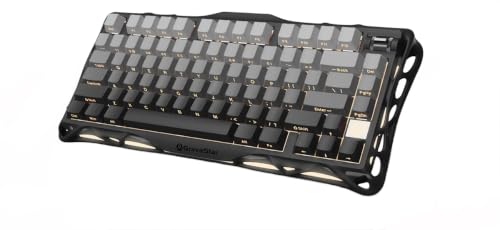
- Futuristic Design: The Mercury K1 features a unique aluminum alloy exoskeleton with a gradient black finish, combining strength and lightness in its flowing curves. This design
- Custom GravaStar x Kailh Linear Switches: Equipped with exclusive GravaStar x Kailh linear switches, the K1 offers a smooth and responsive typing experience. With a 40gf actuation

- Tri-mode Connection Keyboard: AULA F75 Pro wireless mechanical keyboards work with Bluetooth 5.0, 2.4GHz wireless and USB wired connection, can connect up to five devices at the
- Hot-swap Custom Keyboard: This custom mechanical keyboard with hot-swappable base supports 3-pin or 5-pin switches replacement. Even keyboard beginners can easily DIY there own

- HyperX Mechanical Switches rated for 80 million keystrokes
- Full aircraft-grade aluminum body
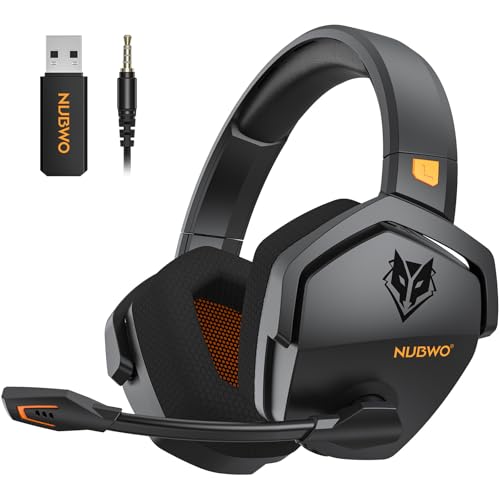
- Zero-Latency, Interference-Free Wireless Gaming Headset: Powered by proprietary 2.4GHz wireless technology, the NUBWO G06 ensures flawless connectivity during intense gaming
- 100-Hour Uninterrupted Gaming: Powered by a 1200mAh high-capacity battery and Proprietary Low-Power Chipset Technology, the NUBWO G06 delivers 50% reduced energy consumption

- Smart LCD Screen & Multi-function Knob: Stylish AULA S98 Pro wireless mechanical keyboard with smart LCD screen and multi-function knob will lead the new trend. The screen
- Tri-mode Mechanical Keyboard & Multi-Device Connection: The AULA S98 Pro mechanical gaming keyboard supports

- 【75% Space‑saving Layout】The KN85 series is a compact 85‑key keyboard (13.68" × 5.51" × 1.77") that keeps all the essentials (F1–F12, arrows, shortcuts) without the number pad. It
- 【Tri-Mode Connectivity for Multi-Device Workflow】Connect via USB‑C, 2.4GHz wireless, or Bluetooth 5.0 (3 channels supported), with ultra‑low latency (USB 2ms, 2.4G 5ms, BT 11ms)
Why the 30+ Crowd Is Driving the 2026 Enthusiast-Gear Boom
The Reddit thread we mentioned surfaced something reviewers have been tracking for a while: the biggest growth in the mechanical keyboard and premium headset segment isn't teenagers, it's adults in their 30s and 40s. That makes sense. This is the cohort that grew up wiring their own IRQs, tweaking autoexec.bat, and building rigs from Fry's Electronics parts bins.
Modern gaming peripherals let that crowd scratch the same itch. A 75% layout with hot-swap sockets is basically the 2026 equivalent of a modded Model M. You get to choose the switch feel, the keycap profile, the sound signature, the RGB pattern. It's tinkering as a feature, not a bug.
What Changed Since 2020
Three things pushed enthusiast gear from niche to mainstream. First, gasket-mount construction, once a $250+ custom-build feature, is now standard on $60 boards. Second, tri-mode wireless (2.4GHz, Bluetooth, USB-C) is table stakes rather than premium. Third, pre-lubed switches out of the box mean no one has to spend a Saturday with tweezers and Krytox 205g0 anymore, unless they want to.
The result: even a $45 board today outperforms a $150 gaming keyboard from five years ago on typing feel, sound, and customization. That's the context for every pick below.
The Best Gaming Keyboards and Headsets for 2026
EPOMAKER x Aula F75 MAX: Best Overall Value
If you asked us to hand one keyboard to a returning-to-PC-gaming adult who hasn't shopped for peripherals since a Logitech G15, this is it. At $71.99, the EPOMAKER x Aula F75 MAX packs a TFT screen, a control knob, gasket mount construction, hot-swap sockets, and full RGB into a 75% layout that works with PC, Mac, and Linux out of the box.
The 75% layout is the sweet spot for the nostalgic gamer: full arrow keys and a function row, no numpad taking up mouse space. The included knob is genuinely useful for volume, timeline scrubbing, or zoom in productivity apps.
Trade-offs: The TFT screen is a fun gimmick but the software to customize it isn't as polished as the hardware. And while the board is wireless, battery life numbers depend heavily on how aggressive you run the RGB.
GravaStar Mercury K1: Best Premium Build
The Mercury K1 is the board you buy when you want to feel the money. At $116.95, it's built around a CNC aluminum alloy chassis in a 75% gasket-mount layout with linear switches, hot-swap sockets, and a gradient black finish that photographs beautifully on a desk setup.
Aluminum construction matters for two reasons: acoustic damping and rigidity. A metal chassis eliminates the hollow, pingy sound that plagues plastic boards, and it holds up to a decade of heavy typing without flex or creak.
Trade-offs: Weight. An aluminum 75% is not something you casually toss in a laptop bag. And at this price, you're paying a premium for materials, not extra features, the feature list is broadly similar to boards half the cost.
AULA F75 Pro: Best Enthusiast Wireless Under $70
The AULA F75 Pro at $66.49 hits a specific sweet spot: pre-lubed Reaper switches, side-printed PBT keycaps, a knob, RGB, hot-swap, and true tri-mode wireless (2.4GHz, USB-C, Bluetooth 5.0). It's the board we recommend to people who want the enthusiast experience without any DIY effort.
Pre-lubed switches are the killer feature here. Lubing switches by hand is a rite of passage in the mechanical keyboard hobby, but it's tedious. Getting a factory-lubed linear switch means smoother keystrokes out of the box with no maintenance.
Trade-offs: Side-printed keycaps look clean but reduce RGB shine-through if that matters to you. And the Reaper linear switches are excellent for gaming but some typists prefer tactile switches for daily writing work.
AULA F75 (White & Blue): Best Aesthetic Pick
The base AULA F75 at $63.99 in the white and blue colorway is the board for the streaming setup that photographs well. Same core spec sheet as its Pro sibling, pre-lubed Reaper switches, hot-swap, tri-mode wireless, RGB, in a colorway that pops on camera without screaming gamer aesthetic.
AULA calls the sound profile "creamy," which is enthusiast shorthand for the deeper, thockier acoustic signature that gasket-mount boards produce versus the harsher click of older tray-mount designs.
Trade-offs: No knob, unlike the Pro. If you use volume or scroll controls constantly, spend the extra six bucks.
HyperX Alloy Origins: Best Wired Gaming Keyboard
Not everyone wants wireless. If you play competitive FPS titles and want the absolute lowest latency plus a rock-solid warranty from a mainstream brand, the HyperX Alloy Origins at $98.82 is our pick. Compact form factor, RGB, HyperX Red linear switches, and software-controlled lighting and macro customization.
HyperX's Red linear switches are similar in feel to Cherry MX Reds but with a slightly shorter actuation, making them well-suited to fast-twitch shooters. According to standard keyboard switch classification, linear switches like these have no tactile bump, giving smooth uninterrupted travel from top to bottom.
Trade-offs: Not hot-swappable. If you ever want to try a different switch feel, you're either done or soldering. And no numpad in this compact version, which some spreadsheet-heavy users will miss.
NUBWO Wireless Gaming Headset: Best Budget Wireless Audio
The NUBWO wireless headset at $29.99 is the surprise-and-delight pick of the year. Advertised 100-hour battery life, 23ms low-latency wireless sync, triple-mode compatibility across PS5, PS4, PC, and mobile, and a detachable mic, all for less than the cost of two new AAA game releases.
For casual multiplayer or single-player narrative gaming where you just need clear audio and reliable voice chat, this is a genuine steal. The 100-hour battery figure means you're charging maybe once a month.
Trade-offs: Sub-$30 headsets are not going to compete with an Audeze or a HiFiMan on sound stage or driver quality. The orange colorway is bold and won't suit every setup. And build materials are plastic-forward, expect a two-to-three-year lifespan under heavy use.
Who This Is For
The Returning Adult Gamer
You played Half-Life 2 at launch. You built a PC in 2007 and then life happened, kids, career, mortgage. Now you've got a Steam Deck, a decent monitor, and a couple hours a week to actually enjoy a hobby. You want gear that feels premium without requiring three weekends of research.
Our recommendation: EPOMAKER x Aula F75 MAX plus the NUBWO headset. Total spend under $105 for a setup that outperforms anything you had in your peak PC-gaming era.
The Enthusiast Rebuilder
You already know what a Cherry stem is. You've seen the ThereminGoat sound tests on YouTube. You want gear you can tinker with, hot-swap switches, change keycaps, mod the case.
Our recommendation: GravaStar Mercury K1 as your daily driver, AULA F75 Pro as a secondary board for testing different switches. Total spend under $185.
The Competitive Player on a Budget
You're deep into Valorant, Apex, or Counter-Strike 2. Latency matters more to you than build materials. You need a keyboard that doesn't drop inputs at 240Hz and a headset with reliable comms.
Our recommendation: HyperX Alloy Origins wired for zero-latency competitive play, plus the NUBWO for casual sessions and party chat. Total spend around $130.
What to Look For in a 2026 Gaming Keyboard
Layout: 75% Is the New Standard
Full-size boards are dead for most gamers. 75% keeps the arrow keys and function row you actually use while ditching the numpad, giving your mouse hand more real estate. TKL (tenkeyless) is still viable if you want a slightly wider board with dedicated home/end keys.
60% is minimalist but requires layer-hopping for arrows and function keys, which is annoying in productivity workflows. Unless your desk is tiny, 75% is the answer.
Switches: Linear vs Tactile vs Clicky
Linear switches (Red, Yellow, Reaper) have smooth uninterrupted travel and are preferred for gaming because they're fast to actuate repeatedly. Tactile switches (Brown, Holy Panda) have a bump partway through the keystroke, better for typists who want feedback. Clicky switches (Blue) add an audible click, best for people who live alone or have very tolerant roommates.
Most gaming-focused boards in 2026 ship with linear switches by default. Hot-swap sockets let you swap without soldering if you change your mind.
Build: Gasket Mount Is Worth It
Gasket-mount construction uses rubber or foam gaskets to isolate the switch plate from the chassis. The result is a softer typing feel and a warmer, deeper sound profile than the traditional tray-mount design where the plate screws directly to the case.
Every board in this guide except the HyperX uses gasket mount. It's the single biggest reason modern budget boards sound and feel better than five-year-old flagships.
Connectivity: Tri-Mode Is Table Stakes
Tri-mode means 2.4GHz wireless (via included dongle, low latency), Bluetooth 5.0 (multi-device pairing), and USB-C (wired, for charging or lowest-latency competitive play). If a wireless board doesn't offer all three, ask why.
2.4GHz is what you use for gaming. Bluetooth is for switching to your iPad or phone. USB-C is your backup and charging cable.
Keycaps: PBT vs ABS
PBT (polybutylene terephthalate) keycaps are denser, more textured, and don't develop the shiny worn look that plagues cheaper ABS caps. Any board in this guide with PBT caps is going to age gracefully.
Side-printed vs top-printed legends is aesthetic preference: side-printed looks cleaner but hides in low light unless you have muscle memory or good backlighting.
Wireless Headset Considerations
The three specs that actually matter for wireless gaming headsets are latency (under 40ms feels indistinguishable from wired), battery life (aim for 30+ hours minimum for weekly charging), and mic quality. Console compatibility matters if you're not PC-only: PS5 support in particular often requires 2.4GHz dongle rather than Bluetooth. The FCC's overview of wireless connectivity standards is a useful primer if you want to understand why 2.4GHz outperforms Bluetooth for real-time gaming audio.
Runner-Ups Worth Considering
AULA S98 Pro: Bigger Layout With Screen
If you actually want a 98% or larger layout with a screen and knob and can't quite let go of the numpad, the AULA S98 Pro at $50.99 is a solid pick. Same pre-lubed linear switches and PBT keycaps as the F75 line, just in a wider chassis.
Kisnt KN85: Retro Beige Aesthetic Pick
The Kisnt KN85 at $44.99 in Retro Beige leans into the vintage-computing aesthetic hard. If you built your first PC in a beige Antec case and want to recapture that, this is the board. 75% layout, hot-swap, tri-mode wireless, custom RGB.
What We Don't Recommend
Full-size RGB gaming boards from mainstream brands over $150. You're paying for marketing and a brand name. The $70 boards in this guide match or exceed them on every meaningful spec.
Cheap membrane keyboards labeled as gaming keyboards. If it has RGB and costs $25 without mechanical switches, it's a rebadged office keyboard with a light show. Skip it.
Headsets over $200 for casual gaming. Diminishing returns kick in hard past $100. Unless you're a competitive esports player or an audio hobbyist, a $30-60 wireless headset covers 95% of the value.
Any keyboard without hot-swap sockets at this price point. Hot-swap has become standard. Boards without it are a bad long-term investment because they lock you into whatever switches you buy today.
Frequently Asked Questions
Do I really need a mechanical keyboard for gaming?
Need? No. But once you use one, going back to membrane feels like typing through pudding. The key benefits are consistent actuation force, longer switch lifespan (50-100 million presses vs 5-10 million for membrane), and the ability to swap switches when you get bored of the feel.
Is 2.4GHz wireless really as fast as wired for competitive gaming?
Modern 2.4GHz gaming keyboards typically post latency under 5ms, which is functionally indistinguishable from wired for human reaction times. Bluetooth is a different story, expect 15-30ms of added latency, noticeable in competitive FPS but fine for everything else.
What's the difference between a $50 and $120 mechanical keyboard in 2026?Mainly build materials. A $50 board typically has an ABS plastic chassis and basic PBT keycaps. A $120 board like the GravaStar Mercury K1 gives you CNC aluminum, better acoustic damping, and higher-tier keycaps. The typing experience differential is meaningful but not night-and-day.Are 75% keyboards good for productivity or just gaming?
Excellent for both. You keep the arrow keys and function row that productivity apps rely on. The only real loss is the numpad, which matters if you enter numeric data all day. Most people don't.
How long should a wireless gaming headset actually last?
Battery-per-charge should be 20+ hours minimum in 2026, with premium models hitting 60-100 hours like the NUBWO. Total device lifespan depends on build quality and how gently you treat the ear cushions and hinges. Budget: 2-3 years. Mid-range: 4-6 years. Premium: 7+ years with occasional pad replacements.
Are pre-lubed switches actually better than lubing yourself?
For most people, yes. Factory lubing is consistent and gets you 90% of the benefit of a hand-lubed switch with zero effort. Enthusiasts will still hand-lube because they can tune the feel more precisely, but that's a hobby choice, not a performance requirement.
Can I use a wireless PC keyboard with my PS5 or Xbox?
PS5 supports USB and Bluetooth keyboards natively for text entry and some games. Xbox support is more limited and game-dependent. If cross-platform use matters, verify compatibility with your specific console before buying.
Final Thoughts
The Reddit thread that inspired this piece was ultimately about how gaming has changed. It has, obviously. But the DIY, tinker-with-your-rig spirit that defined the golden age of PC gaming is very much alive, it just moved from BIOS overclocking and Voodoo cards to switch swapping and gasket mods.
Whatever your budget, the 2026 landscape rewards you for actually caring about your gear. Pick something from the list above, tune it to your taste, and enjoy the fact that you no longer have to wait for the mail carrier to bring you next month's cover disc.